This is the multi-page printable view of this section. .
2025 Smart Community
- 1: Overview
- 2: Usage
- 3: Hardware and drivers
- 4: Navigation
- 5: Vision
- 6: Match tasks
- 7: Summary
- 8: Appendix
Vehicle ROS documentation for the Smart Community event of the Global AI Algorithm Elite Competition. National second prize, 2025. The code is three packages: community_nav, community_vision, and community_mission.
Follow the sidebar or the list on this page: overview, usage, each module, summary, then the appendix.
Overview
What the robot does, how the three packages split the work, and how data moves.
Usage
Environment, dependencies, build, and the three terminals used in a match.
Hardware and drivers
Chassis, IMU, lidar, Orbbec camera, and the driver chain started by nav_multi.launch.
Navigation
Map, AMCL, move_base, and where the parameter files live.
Vision
Traffic lights, dolls, fire, license plates, trash bins, e-bikes, and the model for each.
Match tasks
Waypoints in main_nav.py, the task at each stop, and the topics shared with vision.
Summary
How the three packages fit together, and where to edit waypoints or models.
Appendix
A function-to-file index, plus scripts that the three-step start does not launch.
1 - Overview
National second prize, 2025, in the Smart Community event of the Global AI Algorithm Elite Competition. The robot cruises the community, runs recognition at set stops, and speaks the results. Localization is AMCL, planning is move_base, and vision is a separate ONNX node.
- Platform: ROS Noetic · Ubuntu 20.04 · catkin workspace
- Code:
community_nav,community_vision,community_mission
What the system does
The match is three pipelines:
- Navigation —
main_nav.pyfollows waypoints written into the script (move_base+ AMCL) - Perception — at a task stop, a topic asks the vision node to run once
- Speech — zone totals and some detection results are spoken with
espeak
This stack does not use the later RAICOM prep/go scripts, and it does not write a report file. A match is three terminals, started in order.
Three packages
| Package | Role | What starts it |
|---|---|---|
community_nav | Map, chassis, IMU, lidar, EKF, AMCL, move_base, Orbbec camera | roslaunch community_nav nav_multi.launch |
community_vision | Subscribe to the camera and switch detection tasks by topic | python yolo_onnx.py (conda paddle_env) |
community_mission | Waypoints and the task at each stop | python main_nav.py (system Python) |
orbbec_camera, lslidar_driver, and car_bringup are not in these three packages. They already lived in the robot workspace.
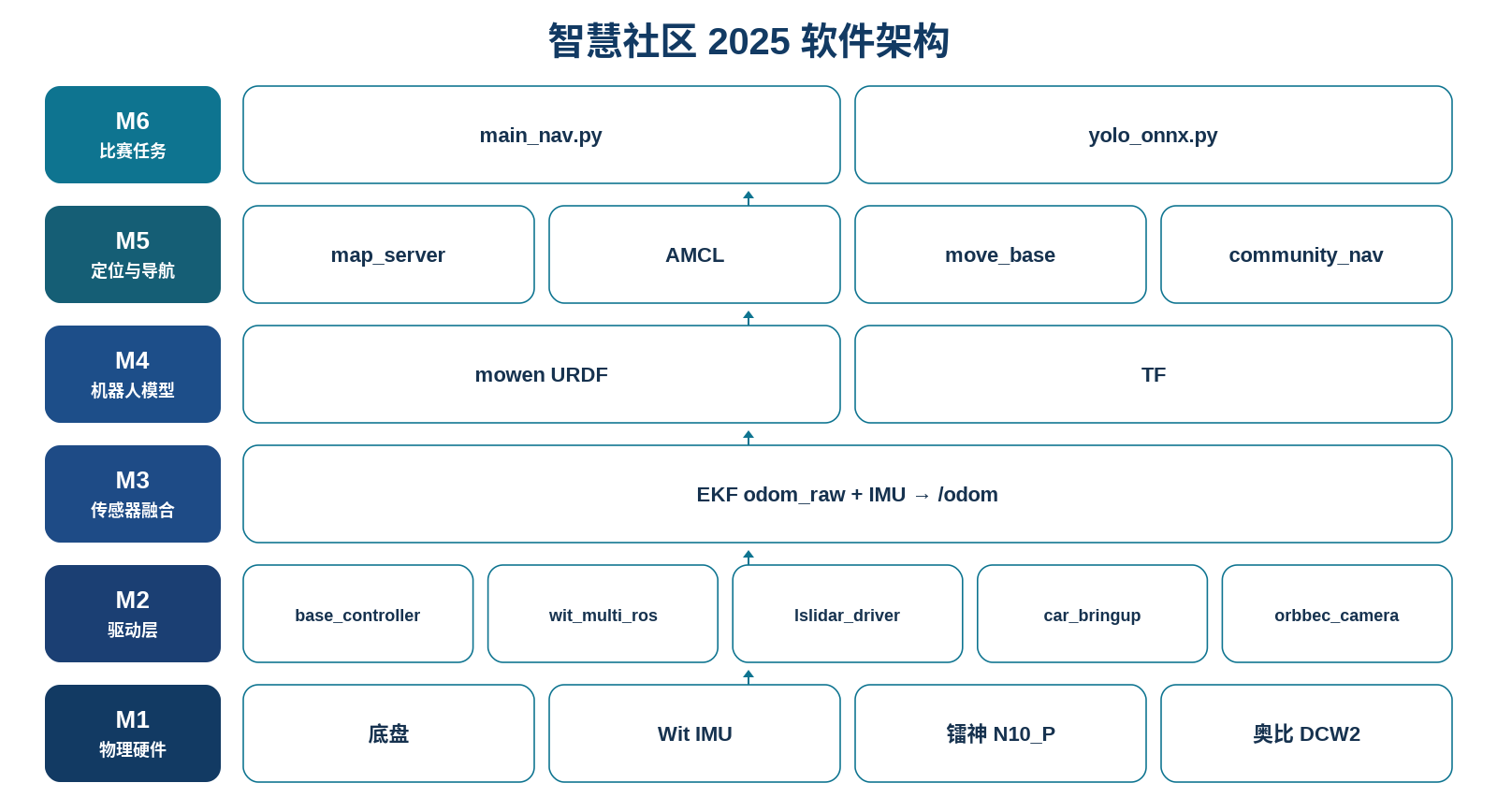
Data flow
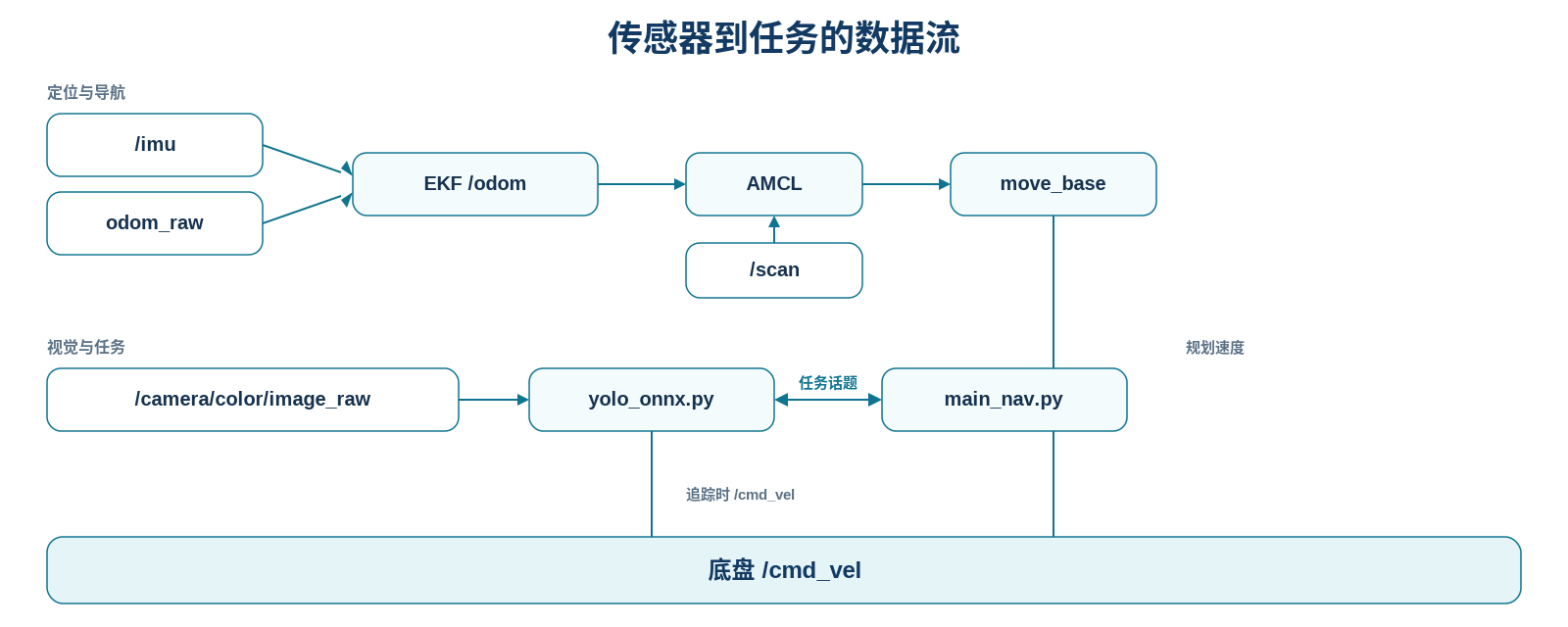
Sensors → fusion → localization → planning → chassis
- Lidar
/scan, IMU, andodom_rawpass through the EKF to produce/odom - AMCL localizes with
/scanand the map, and publishesmap → odom move_basesends velocity to the chassis
Task triggers are topics, not services. main_nav.py publishes /traffic, /person_detect, and the other commands. yolo_onnx.py answers on the matching status topic. During e-bike tracking, the vision node publishes /cmd_vel directly.
Camera
Every vision task uses the color image from an Orbbec Dabai DCW2, topic /camera/color/image_raw. nav_multi.launch includes dabai_dcw2.launch from orbbec_camera. The monocular usb_cam include in that launch is commented out.
Startup order
| Order | Terminal | Command |
|---|---|---|
| 1 | System Python | roslaunch community_nav nav_multi.launch |
| 2 | conda paddle_env | python yolo_onnx.py |
| 3 | System Python | python main_nav.py |
Wait until step 1 is publishing camera images and step 2 logs that the multi-task detector is ready, then run step 3. Details are in Usage.
What the mission node waits for
After main_nav.py connects to move_base, it walks the waypoints. A plain stop pauses for 0.5 seconds. A task stop blocks until the vision node replies, then the next waypoint starts. A traffic light blocks until the light is recognized as green. When the waypoint list ends, the mission ends.
2 - Usage
Treat the directory that contains src/community_nav, src/community_vision, and src/community_mission as the catkin workspace. You can also copy those three packages into an existing competition_ws/src and build there.
Requirements
| Component | Notes |
|---|---|
| OS | Ubuntu 20.04 |
| ROS | Noetic |
| This workspace | The three packages above |
orbbec_camera | Dabai DCW2, not in this workspace |
lslidar_driver | Leishen lidar driver, not in this workspace |
car_bringup | Odometry node base_node, not in this workspace |
Conda paddle_env | Only for yolo_onnx.py |
If ros-noetic-desktop-full is already installed, navigation and RViz are usually present. Install anything still missing:
Speech uses espeak -v zh. If the log says Full dictionary is not installed for 'zh', the Chinese voice data is incomplete. Speech will be unclear. Navigation and recognition still run.
Vision environment
environment.yml is at the workspace root. The environment name is paddle_env, Python 3.10. It is a full export from the match machine, so it is large.
yolo_onnx.py imports onnxruntime, opencv-python, numpy, pillow, ultralytics, cnocr, and cnstd. The OCR models for plates and building names download into ~/.cnstd on first run, which needed a network connection.
main_nav.py uses the ROS Python install. Do not enter paddle_env for it.
Build
Every new terminal must source ROS, then this workspace’s devel/setup.bash.
Devices
| Device | Node | Parameters |
|---|---|---|
| Chassis | /dev/carserial | 115200, base_controller.py |
| IMU | /dev/imu | 9600, wit_multi_ros.py |
| Lidar | /dev/lslidar | Leishen N10_P serial |
| Camera | Orbbec Dabai DCW2 | /camera/color/image_raw |
Match start (three terminals)
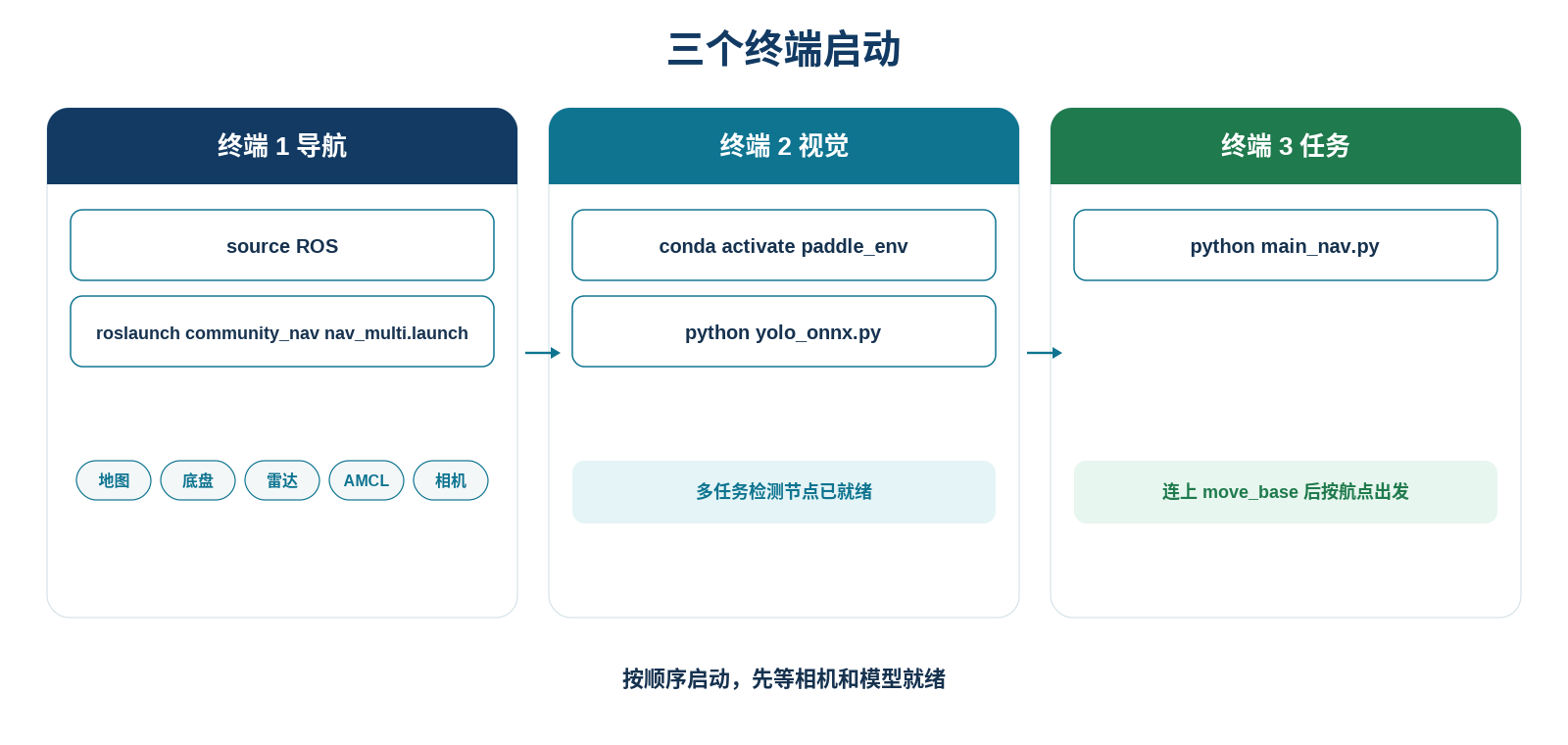
1. Navigation
Do not enter conda.
This starts the map, chassis, IMU, lidar, AMCL, move_base, the Orbbec camera, and RViz. To skip RViz:
2. Vision
Wait until the camera topic has data. This terminal must enter conda and still source ROS, or rospy and cv_bridge will not line up.
The script loads traffic.onnx and the other models by filename in the current directory. Do not rosrun it from another working directory.
Continue only after the log says the multi-task detector is ready. Snapshots and tracking videos are written to ro_test_img/ in that same directory.
3. Mission
Use system Python. Do not conda activate.
rosrun community_mission main_nav.py also works. After it connects to move_base, it starts at waypoint 1.
Where the models live
All of them sit next to yolo_onnx.py in src/community_vision/:
| File | Role |
|---|---|
traffic.onnx | Traffic lights |
best.onnx | Dolls (good / bad) |
fire.onnx | Fire |
bin_new.onnx | Trash-bin open or closed |
rubbish.onnx | Trash class |
motorbike.onnx | E-bike snapshot and tracking |
License plates and building names do not use these files. They use CnOcr.
3 - Hardware and drivers
Hardware
| Device | Role | Node |
|---|---|---|
| Chassis | Motion | /dev/carserial, 115200 |
| Wit IMU | Attitude | /dev/imu, 9600 |
| Leishen N10_P | 2D lidar /scan | /dev/lslidar |
| Orbbec Dabai DCW2 | Color image for every vision task | /camera/color/image_raw |
The body model is community_nav/urdf/mowen.urdf.xacro. The mesh is meshes/base_link.STL.
In this package, and outside it
Nodes that community_nav starts itself:
| Node | Role |
|---|---|
wit_multi_ros.py | IMU, publishes /imu |
base_controller.py | Chassis serial port |
robot_state_publisher | TF from the URDF |
ekf_localization_node | odom_raw + /imu → /odom |
Three other packages are included from launch files. Their source is not in community_nav:
| ROS package | Role |
|---|---|
lslidar_driver | Lidar, lslidar_serial_multi.launch |
car_bringup | base_node turns wheel speed into odom_raw |
orbbec_camera | dabai_dcw2.launch |
Bringup chain
nav_multi.launch starts map_server first, includes bringup_robot.launch and move_base_multi.launch, then includes the Orbbec camera.
Order inside bringup_robot.launch:
Static TF:
| Transform | Notes |
|---|---|
base_footprint → laser_link | 0.1 0 0.05, yaw of π |
base_footprint → base_link | Identity transform, for the IMU |
EKF parameters are param/robot_localization.yaml. Inputs are remapped to odom_raw and imu. The output is remapped to odom. odom_frame and world_frame are both odom. base_link_frame is base_footprint.
Lidar angle mask
In lslidar_serial_multi.launch, truncated_mode is 1 and the masked sector is about 90° to 270°. Change that launch when the lidar mask changes. Do not change the vision script.
4 - Navigation
roslaunch community_nav nav_multi.launch starts the whole navigation stack. Localization is AMCL, not Cartographer.
Core pieces
| Piece | Role | Location |
|---|---|---|
map_server | Publishes /map | maps/multi_map.yaml, multi_map.pgm |
| AMCL | map → odom | move_base_multi.launch |
move_base | Global planner plus DWA | Same launch; parameters in param/ |
| EKF | /odom | bringup_robot.launch |
Map resolution is 0.05 m and the origin is [-5, -5, 0]. After replacing the map, remeasure the waypoints in main_nav.py. They are written into the script and are not loaded from yaml.
Parameter files
All of them are in community_nav/param/:
| File | Contents |
|---|---|
costmap_common_params.yaml | Loaded for both global and local costmaps |
global_costmap_params.yaml | Global costmap |
local_costmap_params.yaml | Local costmap |
global_planner_params.yaml | Global planner |
dwa_local_planner_params.yaml | DWA |
move_base_params.yaml | move_base itself |
robot_localization.yaml | EKF, loaded by bringup |
In move_base_multi.launch, AMCL odom_model_type defaults to omni.
Velocity
Most of the time velocity comes from move_base. At the e-bike tracking stop (waypoint 32), main_nav.py waits there. yolo_onnx.py publishes /cmd_vel directly, then publishes a zero twist, and the mission node continues with the later waypoints.
The RViz config is rviz/nav_riz.rviz. use_rviz:=false turns it off.
Mapping
The match launch loads the existing multi_map. To rebuild it, use launch/gmapping_multi.launch. That launch is not part of the three-step start. After mapping, replace maps/multi_map.yaml and multi_map.pgm, then check the waypoints again.
5 - Vision
The node name is multi_task_detector. The script is community_vision/yolo_onnx.py. It subscribes to /camera/color/image_raw and stays idle until a task topic arrives. It then runs once, or tracks for a stretch, and publishes the result.
Traffic lights, dolls, fire, and trash bins use a small ONNX Runtime wrapper. E-bikes use ultralytics on motorbike.onnx. License plates and building names use CnOcr.
Models
| File | Task | Classes |
|---|---|---|
traffic.onnx | Traffic lights | Red, yellow, green |
best.onnx | Dolls | good is a resident, bad is not |
fire.onnx | Fire | Count of detection boxes |
bin_new.onnx | Bin open or closed | Kitchen, hazardous, other, recyclable; open or closed |
rubbish.onnx | Trash inside a bin | Mapped by bin color, then marked correct or wrong |
motorbike.onnx | E-bikes | Upright or fallen; snapshot or ByteTrack |
Those six files must sit in the same directory as the script. Snapshots overwrite files in ro_test_img/, including result_person.jpg, result_fire.jpg, result_plate.jpg, result_trash.jpg, and result_bicycle_snapshot.jpg. Tracking also writes raw_record.mp4 and output_tracked.mp4.
Topics
| Task | Mission publishes | Vision replies |
|---|---|---|
| Traffic light | /traffic | /traffic_light_status |
| Dolls | /person_detect | /person_detect_status |
| Building / fire | /fire_detect | /fire_detect_status |
| License plate | /plate_detect | /plate_detect_status |
| Trash bins | /trash_bin_detect | /trash_bin_status |
| E-bike tracking | /bicycle_detect | /bicycle_detect_status |
| E-bike snapshot | /bicycle_snapshot | /bicycle_snapshot_status |
Doll results are comma-separated good / bad. A snapshot looks like Total:1,Normal:0,Fallen:1. The mission node moves on from a traffic light only when the status string is 绿灯.
What each task does
Traffic light
When it sees green it publishes 绿灯. The mission node waits until that string arrives.
Dolls
good counts as a resident and bad as a non-resident. Totals and the spoken summary are accumulated by zone A or B inside main_nav.py. The vision node only returns the current frame.
Building and fire
OCR runs on the frame first and keeps building names such as 锦绣大厦 and 盛世大厦. fire.onnx then counts fire boxes. The reply to the mission node is one Chinese sentence with the building name and the hazard count.
License plate
CnOcr reads the plate and espeak speaks it. The mission node only waits for a completion signal.
Trash bins
bin_new.onnx sees whether each bin is open or closed. rubbish.onnx sees what is inside. The script checks that against the bin color, then speaks one sentence.
E-bikes
A snapshot is a single frame. It counts upright and fallen bikes and adds them to zone A or B.
Tracking has two stages:
- The vision node publishes
/cmd_vel, drives, and records the raw frames toraw_record.mp4 - At the goal it stops, runs ByteTrack offline, counts upright and fallen bikes in the parking area, and tells the mission node
6 - Match tasks
The script is community_mission/main_nav.py. The node name is navigation_task_node. The points list at the top of the file has 36 poses in the map frame. Numbers start at 1, matching the log line “到达点 N”.
The script does not recognize anything itself. At a task stop it publishes a topic, blocks until vision replies, then goes to the next point. A stop it cannot reach logs a warning, and the loop continues.
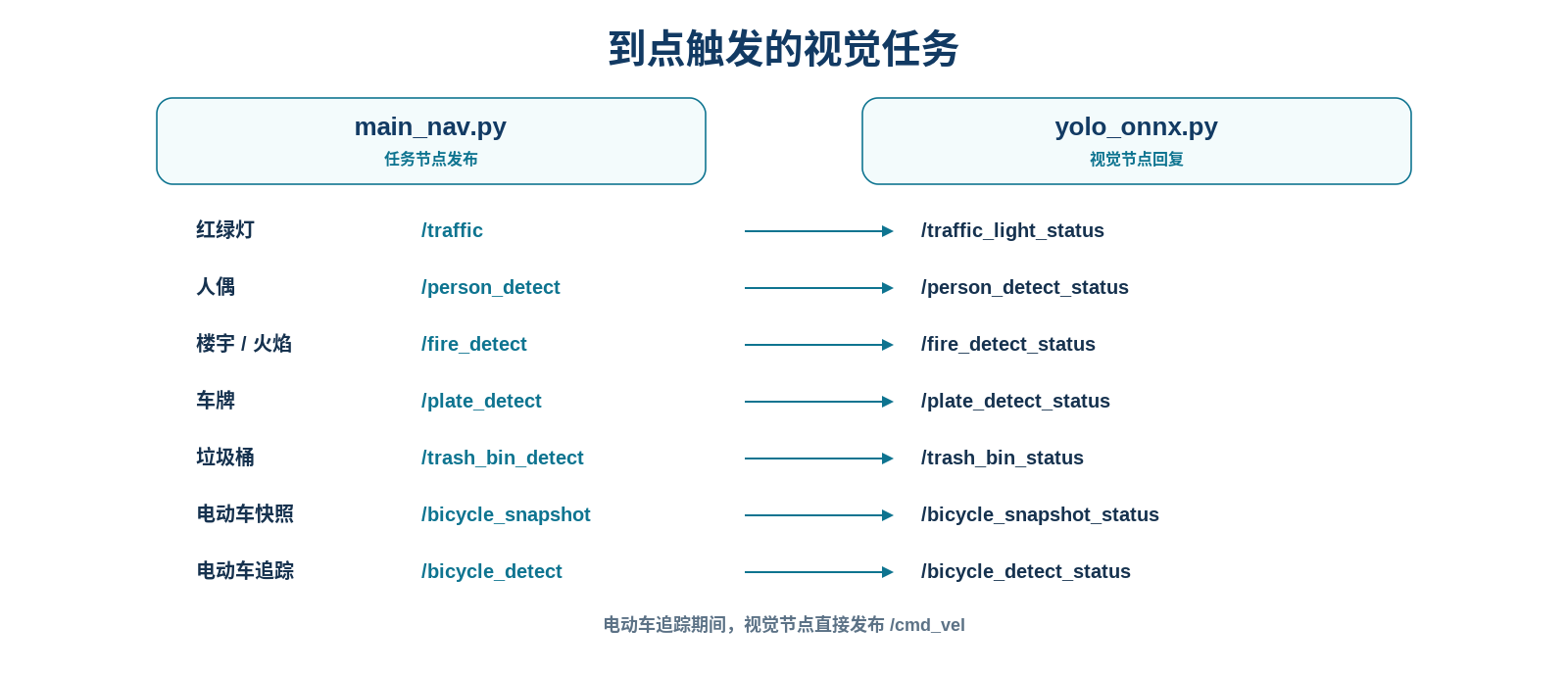
Tasks on the course
| Stop | Task |
|---|---|
| 1, 20 | Traffic light. Wait until /traffic_light_status is 绿灯 |
| 9 | Speak “前方是禁止直行指示牌” |
| 3, 8, 12 | Zone A: dolls, then an e-bike snapshot |
| 13, 18 | Zone B: dolls, then an e-bike snapshot |
| 15, 19, 31 | Building name and fire |
| 23, 25, 30 | License plate |
| 27 | Trash bins and whether the trash was sorted correctly |
| 32 | Moving e-bike tracking. Vision publishes velocity during this stretch |
| The rest | Waypoint only. Pause 0.5 seconds after arrival |
Zone A speaks once, after all three of its detection stops. Zone B speaks once, after both of its stops. The sentence gives the resident count, the non-resident count, and the total e-bikes snapshotted at those doll stops (upright plus fallen).
A result token that starts with g counts as a resident. A token that starts with b counts as a non-resident.
Contract with vision
| Mission publishes | Payload | Reply it waits for |
|---|---|---|
/traffic | traffic | /traffic_light_status = 绿灯 |
/person_detect | start | /person_detect_status |
/bicycle_snapshot | snap | /bicycle_snapshot_status |
/fire_detect | start | /fire_detect_status |
/plate_detect | start | /plate_detect_status |
/trash_bin_detect | start | /trash_bin_status |
/bicycle_detect | start | /bicycle_detect_status |
The node sleeps 0.5 or 1 second before publishing, so the camera and the previous frame can settle. Right after doll detection, the same stop runs an e-bike snapshot, and that snapshot is added to the current zone, A or B.
Speech
speak() starts a thread that runs espeak -v zh. Zone A/B summaries, the no-straight-ahead sign, and the plate and trash sentences from the vision node all use that path. The Chinese building-and-fire sentence stays in the log. After the mission node receives it, the robot continues and does not speak it again.
7 - Summary
Dependencies
Layers and data flow are in the overview. The start order cannot be reversed: move_base and the camera first, then the models, and only then the waypoints. If the vision node starts after the mission node, the mission waits forever at the first traffic light.
Where to change things
| Goal | Edit |
|---|---|
| Waypoints, headings, or which stop runs which task | points and the *_indices lists in community_mission/main_nav.py |
| A detection model or a threshold | community_vision/yolo_onnx.py. Keep the model file beside that script |
| Costmaps, DWA, or AMCL | community_nav/param/ and launch/move_base_multi.launch |
| Serial ports, the lidar mask, or TF | community_nav/launch/ |
| The match map | community_nav/maps/multi_map.yaml and .pgm, then remeasure waypoints |
yolo_onnx.py needs ONNX and ultralytics from conda. main_nav.py needs system rospy. On the vision terminal, conda activate paddle_env and then source ROS.
Entry points
| Use | Path |
|---|---|
| Navigation launch | src/community_nav/launch/nav_multi.launch |
| Vision node | src/community_vision/yolo_onnx.py |
| Mission node | src/community_mission/main_nav.py |
| Models | src/community_vision/*.onnx |
| Conda environment | environment.yml at the workspace root |
The file index is in the appendix.
8 - Appendix
Function to file
| To change or inspect | Path (from the workspace) |
|---|---|
| Full vehicle start | src/community_nav/launch/nav_multi.launch |
| Chassis, IMU, EKF, URDF | src/community_nav/launch/bringup_robot.launch |
| AMCL and move_base | src/community_nav/launch/move_base_multi.launch |
| Lidar port and angle mask | src/community_nav/launch/lslidar_serial_multi.launch |
| Costmaps and DWA | src/community_nav/param/ |
| Map | src/community_nav/maps/multi_map.yaml |
| Waypoints and task stops | src/community_mission/main_nav.py |
| Detection and speech details | src/community_vision/yolo_onnx.py |
| ONNX | The six files next to the script in src/community_vision/ |
| Run snapshots and tracking video | src/community_vision/ro_test_img/ (created at runtime) |
Files the three-step start does not launch
These remain in community_nav for mapping or collecting points. nav_multi.launch does not start them.
| File | Notes |
|---|---|
launch/gmapping_multi.launch | gmapping |
launch/usb_cam-test.launch | Monocular camera. Commented out of the main navigation launch |
scripts/joy_bringup.py, joy_bringup_ros.py, joy_bringup_ros_yolo.py, joy_ros_tf.py | Joystick waypoint capture and photos |
scripts/uwb_to_pose.py, param/robot_localization_uwb.yaml | UWB. Not loaded by the current bringup |
joy_bringup_ros.py and joy_ros_tf.py still save to absolute paths from the old machine.
Topics
| Name | Notes |
|---|---|
/cmd_vel | To the chassis. The vision node publishes it while tracking an e-bike |
/scan | Leishen lidar |
/odom | EKF output |
/camera/color/image_raw | Orbbec color image. The only vision input |
/move_base | Action client used by the mission node |
/traffic, /traffic_light_status | Traffic light |
/person_detect, /person_detect_status | Dolls |
/fire_detect, /fire_detect_status | Building and fire |
/plate_detect, /plate_detect_status | License plate |
/trash_bin_detect, /trash_bin_status | Trash bins |
/bicycle_detect, /bicycle_detect_status | E-bike tracking |
/bicycle_snapshot, /bicycle_snapshot_status | Single-frame e-bike snapshot |